# JWT app returns "invalid token"
**URL:** https://devforum.zoom.us/t/jwt-app-returns-invalid-token/13214
**Category:** API and Webhooks
**Created:** [April 15, 2020, 1:19am UTC](https://devforum.zoom.us/t/jwt-app-returns-invalid-token/13214 "2020-04-15T01:19:53Z")
**Posts on this page:** 20
**Page:** 1
### Author:  [@Fitpass](https://devforum.zoom.us/u/Fitpass)
#### Post date: [April 15, 2020, 1:19am UTC](https://devforum.zoom.us/t/jwt-app-returns-invalid-token/13214/1 "2020-04-15T01:19:53Z")
**Description**
We have created a JWT app. We are trying to authenticate our API requests using JWT as instructed by Zoom. We have cloned this repo and configured our API key and secret accordingly: [https://github.com/zoom/zoom-api-jwt](https://github.com/zoom/zoom-api-jwt)
**Error**
```auto
{code: 124, message: 'Invalid access token.'}
```
**Which App Type (OAuth / Chatbot / JWT / Webhook)?**
JWT
**Which Endpoint/s?**
`https://api.zoom.us/v2/users/email@domain.org?status=active`
**How To Reproduce (If applicable)**
Steps to reproduce the behavior:
1. Clone the Git repo [https://github.com/zoom/zoom-api-jwt](https://github.com/zoom/zoom-api-jwt)
2. Configure with our API key and secret
3. Run the code
4. See error in console log output
Our particular JWT signing code is:
```auto
const secs = parseInt((new Date()).getTime() / 1000)
//Use the ApiKey and APISecret from config.js
const payload = {
iss: config.APIKey,
exp: secs + 60,
};
const token = jwt.sign(payload, config.APISecret)
```
We chose an expiration of 60 seconds. If we use milliseconds instead of seconds, we get the exact same error.
**Screenshots (If applicable)**
N/A
**Additional context**
We have also tried this Curl request:
```auto
curl --request GET --url "https://api.zoom.us/v2/users?status=active&page_size=30&page_number=1" --header "authorization: Bearer $TOKEN" --header "content-type: application/json"
```
We set the value of `TOKEN` according to your credentials page (for our app), and we get the exact same error.
We have deactivated and activated the app a number of times and this does not fix our problem either.
We notice that there are 2 entries in our app “call log” but we did not make those requests. We have been unsuccessful in every attempt to use a JWT token - both using the Git repo (NodeJS code) and using the JWT token from the credentials web page of the app.
---
### Author:  [@shrijana.g](https://devforum.zoom.us/u/shrijana.g)
#### Post date: [April 15, 2020, 1:54am UTC](https://devforum.zoom.us/t/jwt-app-returns-invalid-token/13214/2 "2020-04-15T01:54:45Z")
Hi @Fitpass,
We apologize that you are running into this issue. Could you send me your Zoom Account Number located in your [Account Profile page](https://support.zoom.us/hc/en-us/articles/115005731743-Account-profile) via message? Thank you.
---
### Author:  [@Fitpass](https://devforum.zoom.us/u/Fitpass)
#### Post date: [April 15, 2020, 3:18am UTC](https://devforum.zoom.us/t/jwt-app-returns-invalid-token/13214/4 "2020-04-15T03:18:33Z")
I just tried the API 2 minutes ago and it worked (hitting the [https://api.zoom.us/v2/users/me](https://api.zoom.us/v2/users/me) endpoint via Curl
Thanks so much for your help. Right now things are good. I don’t believe I need more support.
PS I made no changes, so it must have been a Zoom internal configuration change that enabled my API usage.
---
### Author:  [@tommy](https://devforum.zoom.us/u/tommy)
#### Post date: [April 16, 2020, 5:39am UTC](https://devforum.zoom.us/t/jwt-app-returns-invalid-token/13214/6 "2020-04-16T05:39:09Z")
Hey @Fitpass,
Happy to hear we fixed your issue! 🙂
Let us know if you have other questions or run into any other issues!
Thanks,
Tommy
---
### Author:  [@sara.ismail.badawy](https://devforum.zoom.us/u/sara.ismail.badawy)
#### Post date: [June 3, 2020, 3:08pm UTC](https://devforum.zoom.us/t/jwt-app-returns-invalid-token/13214/7 "2020-06-03T15:08:27Z")
Hi
I’m still having “Invalid access token.”, I’m not sure if I’m runnin into this issue or I have missed somthing.
My account number is 2001033667
Thanks
---
### Author:  [@michael.zoom](https://devforum.zoom.us/u/michael.zoom)
#### Post date: [June 5, 2020, 11:26pm UTC](https://devforum.zoom.us/t/jwt-app-returns-invalid-token/13214/8 "2020-06-05T23:26:23Z")
Hi @sara.ismail.badawy can you provide an example of your token generation method?
---
### Author:  [@mhmoudalaskalany](https://devforum.zoom.us/u/mhmoudalaskalany)
#### Post date: [July 5, 2020, 8:28pm UTC](https://devforum.zoom.us/t/jwt-app-returns-invalid-token/13214/9 "2020-07-05T20:28:00Z")
Am having the same issue i tried the token generated by zoom through post man to call this api
[https://api.zoom.us/v2/users/mhmoudalaskalany@gmail.com/token?type=zak](https://api.zoom.us/v2/users/mhmoudalaskalany@gmail.com/token?type=zak) and am reciving
invalid access token error
can any one help me please
---
### Author:  [@zoomtestjww](https://devforum.zoom.us/u/zoomtestjww)
#### Post date: [July 6, 2020, 3:14am UTC](https://devforum.zoom.us/t/jwt-app-returns-invalid-token/13214/10 "2020-07-06T03:14:43Z")
Hi, I am new to Zoom development. I tried to get the JWT token from the JWT app I created in the Marketplace. When I run the sdk\_demo\_v2\_2017.sln and input the generated JWT token I get the following error:
Error Type: LastErrorType\_Auth
Error Code: 10124
Error Description:
I also tried to edit the JWT through [https://jwt.io/#debugger-io](https://jwt.io/#debugger-io) using the reference below:
[https://marketplace.zoom.us/docs/guides/auth/jwt](https://marketplace.zoom.us/docs/guides/auth/jwt)
I still get the same error.
I’m not sure if I am missing out steps. Thank you.
---
### Author:  [@tippettsna](https://devforum.zoom.us/u/tippettsna)
#### Post date: [July 14, 2020, 3:19pm UTC](https://devforum.zoom.us/t/jwt-app-returns-invalid-token/13214/11 "2020-07-14T15:19:52Z")
I’m having a similar issue to zoomtestjww. I have downloaded and unzipped the SDK Demo. Opened the “2017” solution in VisualStudio 2019. Then removed the references to the two missing files as described here: [Can't get Zoom SDK Demo working with VS 2017 or 2019](https://devforum.zoom.us/t/cant-get-zoom-sdk-demo-working-with-vs-2017-or-2019/4112/2). The solution successfully builds and runs (using “Release” configuration with x86 platform). A window requesting a domain is displayed upon launch. I’ve tried different domains, including our corporate domain, the default [zoom.us](http://zoom.us), as well as others. The next window appears after submitting the domain requesting “SDK JWT Token”. I’ve then retrieved the JWT token from my Zoom app (and followed the recommendations in [https://marketplace.zoom.us/docs/guides/auth/jwt](https://marketplace.zoom.us/docs/guides/auth/jwt)). However I always receive the same error described by zoomtestjww:
Error Type: LastErrorType\_Auth
Error Code: 10124
Error Description:
Our account number is: 422053
Thank you.
---
### Author:  [@zoomtestjww](https://devforum.zoom.us/u/zoomtestjww)
#### Post date: [July 14, 2020, 11:57pm UTC](https://devforum.zoom.us/t/jwt-app-returns-invalid-token/13214/12 "2020-07-14T23:57:14Z")
Hi,
I was able to make it work for me. I just created a new JWT Token at [jwt.io](http://jwt.io) with the following payload:
“appKey”: \,
“iat”: \,
“exp”: \,
“tokenExp”: \
I hope this will solve your issue. Have a great day! 😃
---
### Author:  [@tippettsna](https://devforum.zoom.us/u/tippettsna)
#### Post date: [July 15, 2020, 3:19am UTC](https://devforum.zoom.us/t/jwt-app-returns-invalid-token/13214/13 "2020-07-15T03:19:09Z")
That worked perfectly. Thank you very much!
---
### Author:  [@zoomtestjww](https://devforum.zoom.us/u/zoomtestjww)
#### Post date: [July 15, 2020, 3:28am UTC](https://devforum.zoom.us/t/jwt-app-returns-invalid-token/13214/14 "2020-07-15T03:28:04Z")
You’re welcome! Glad it worked for you. 😄
---
### Author:  [@tommy](https://devforum.zoom.us/u/tommy)
#### Post date: [July 16, 2020, 10:50pm UTC](https://devforum.zoom.us/t/jwt-app-returns-invalid-token/13214/15 "2020-07-16T22:50:25Z")
Hey @mhmoudalaskalany,
Sorry for the late reply, are you still having this issue?
Thanks,
Tommy
---
### Author:  [@tommy](https://devforum.zoom.us/u/tommy)
#### Post date: [July 16, 2020, 10:51pm UTC](https://devforum.zoom.us/t/jwt-app-returns-invalid-token/13214/16 "2020-07-16T22:51:02Z")
Thanks for sharing your solution @zoomtestjww! 🙂
Let us know if you have any other questions @tippettsna!
-Tommy
---
### Author:  [@nick\_ortega](https://devforum.zoom.us/u/nick_ortega)
#### Post date: [July 20, 2020, 5:49pm UTC](https://devforum.zoom.us/t/jwt-app-returns-invalid-token/13214/17 "2020-07-20T17:49:19Z")
I still get the same error as tippettsna did:
> [@tippettsna](#):
>
> Error Type: LastErrorType\_Auth
> Error Code: 10124
> Error Description:
I did try zoomtestjww’s solution, but whether I used jwt API Key and API Secret or the SDK Key and Secret to generate the JWT token, the result was the same.
I don’t know where to find my account number.
---
### Author:  [@csaba.kormoczi](https://devforum.zoom.us/u/csaba.kormoczi)
#### Post date: [July 22, 2020, 9:30pm UTC](https://devforum.zoom.us/t/jwt-app-returns-invalid-token/13214/18 "2020-07-22T21:30:19Z")
Hi, I have the same problem as tippettsna did.
I did try zoomtestjww’s solution, but no success.
Any suggestion?
---
### Author:  [@tommy](https://devforum.zoom.us/u/tommy)
#### Post date: [July 22, 2020, 10:46pm UTC](https://devforum.zoom.us/t/jwt-app-returns-invalid-token/13214/19 "2020-07-22T22:46:40Z")
Hey @csaba.kormoczi, @nick_ortega,
Does the JWT Token generated in the App Marketplace Settings work?
> **[JSON Web Tokens (JWT) - Authorization - Documentation](https://marketplace.zoom.us/docs/guides/auth/jwt#testing)**
>
> JWT With Zoom
>
> The Zoom API uses JSON Web Tokens (JWT) to authenticate account-level access. These tokens offer a method to establish secure server-to-s...
Thanks,
Tommy
---
### Author:  [@csaba.kormoczi](https://devforum.zoom.us/u/csaba.kormoczi)
#### Post date: [July 23, 2020, 4:38am UTC](https://devforum.zoom.us/t/jwt-app-returns-invalid-token/13214/20 "2020-07-23T04:38:21Z")
Hi,
Short answer: no, it does not work.
Long answer:
I have already tried a lot of different options.
The application is the default Windows SDK example, so first I have created an app in the Marketplace with a type SDK. In the app credentials page of this application I have an SDK Key and an SDK Secret. If I put any of these two in the payload (as zoomtestjww suggested, using [jwt.io](http://jwt.io)), I will receive the same error, that he received at the beginning (“Error Type: LastErrorType\_Auth Error Code:10124 Error Description:”). If I put expired timestamps in the payload, I will receive “auth sdk failed” error message. But if the timestamps looks OK, any appKey / SDK Key results with this 10124, both the “good” one from the App Marketplace and the “bad” (random) ones as well. For this app I cannot see the possibility to create the JWT Token directly in the Marketplace.
Then I created another app in the Marketplace, but with a type JWT (although it looks strange, as the app is an SDK app), and tried to use the keys from that app. But the result is always Error 10124, either with the API Key, the API Secret in the payload. If I try to use the JWT Token generated in the Marketplace for this app, then I receive the “auth sdk failed” error.
Thanks,
Csaba
---
### Author:  [@csaba.kormoczi](https://devforum.zoom.us/u/csaba.kormoczi)
#### Post date: [July 23, 2020, 1:57pm UTC](https://devforum.zoom.us/t/jwt-app-returns-invalid-token/13214/21 "2020-07-23T13:57:10Z")
Hi,
I think I could find the cause of the problem…
From the documentation ([https://marketplace.zoom.us/docs/guides/auth/jwt](https://marketplace.zoom.us/docs/guides/auth/jwt)) it is not totally clear, but there is a need for an “iat” (“issued at”) field in the payload as well (as mentioned by zoomtestjww), and the timestamp for this field was not good for me (this should be in the past).
Thanks!
---
### Author:  [@nick\_ortega](https://devforum.zoom.us/u/nick_ortega)
#### Post date: [July 23, 2020, 4:13pm UTC](https://devforum.zoom.us/t/jwt-app-returns-invalid-token/13214/22 "2020-07-23T16:13:07Z")
If I use the JWT Token generated by the “JWT app” (on my app management page online), I get the following error panel:

If I use a JWT token generated by [jwt.io](http://jwt.io) using the SDK key and secret, I get this error panel:
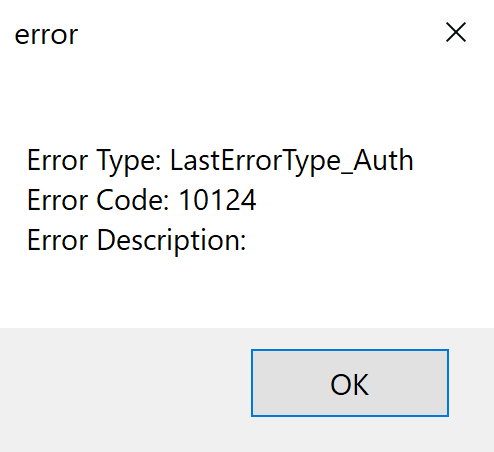
I have tried using “key” and “iss” with the SDK key, including or excluding the “iat” tag, and including or excluding a “tokenExp” tag.
This is what my input to [jwt.io](http://jwt.io) looks like for the SDK key and secret:

Do note that this isn’t an account level problem. With the older version of the sdk, I can input the sdk key and secret directly and the app works fine. I am working with the Visual Studio 2017 build.
[Next page](https://devforum.zoom.us/t/jwt-app-returns-invalid-token/13214.md?page=2)