Zoommtg:// / zoomus:// links now require login for custCreate users (ZAK host flow stopped working)

API Endpoint(s)

  • POST /v2/users?action=custCreate

  • POST /v2/users/{userId}/meetings

  • Using meeting start_url and zoommtg:// / zoomus:// launch links


Description

We host meetings for temporary Zoom users created via the custCreate method.
For years, our app has launched the host’s meeting using a deep link:

zoommtg://zoom.us/start?confno={meetingId}&zak={zak}

(or zoomus://... on mobile)

We make sure that all users have zoom installed before using our platform.

Until recently, this opened the Zoom client directly as the host (no login required) and allowed them to start the meeting.
As of late October 2025, the same URL now prompts the user to sign in to start the meeting.

We generate the ZAK seconds before creating and starting the meeting for the same custCreate user. The start_url (HTTPS) with the same ZAK still works — but it opens a browser page first, which breaks our integrated workflow.

No code or app configuration has changed on our side.


Error / Unexpected Behavior

Zoom desktop and mobile apps now display:

“Sign in to start this meeting”

when launching via zoommtg:// or zoomus:// links that include a valid zak.


How To Reproduce

  1. Create a user via
    POST /v2/users?action=custCreate

  2. Create a meeting via
    POST /v2/users/{userId}/meetings

  3. Immediately launch the host URL:
    zoommtg://zoom.us/start?confno={meetingId}&zak={zak}

  4. Observe the Zoom client asks for login instead of auto-starting as host.

Hi @thand
Thanks for reaching out to us. I will look into this and will reach out back to you soon.
I created an internal ticket for our Engineering team to look into this issue ( ZSEE-185285 for your reference)

Hi @thand
Would you be able to get a screen recording and a sample meeting ID so we can investigate this further?.

1 Like

Hi @thand

Can you please post the configuration you’re using for the actual meeting creation? This feels like something I encountered some time ago and it turned out I had some conflicting config values.

Thanks!

If I use a “zoommtg://” url then it opens the app but nothing happens.

We use custCreate to make sure that we have a zoom user id and then we create a meeting under that user with these options:

  $meeting_options = new stdClass;
            $meeting_options->topic = "My Webcam Interview";
            $meeting_options->type = 2;
            $meeting_options->pre_schedule = 0;
            $meeting_options->start_time = gmdate("Y-m-d \\T H:i:s\\Z");
            $meeting_options->agenda = "Online Discussion";
            $meeting_options->settings = new stdclass;
            $meeting_options->password = element('password', $p_options);
            $meeting_options->settings->host_video = 1;
            $meeting_options->settings->participant_video = 0;
            $meeting_options->settings->waiting_room = 1;
            $meeting_options->settings->approval_type = 2;
            $meeting_options->settings->auto_recording = 'cloud';
            $meeting_options->settings->mute_upon_entry = 1;
            $meeting_options->settings->language_interpretation = new stdclass;
            $meeting_options->settings->language_interpretation->enable = 1;
            $meeting_options->settings->email_notification = 0;
            $meeting_options->settings->meeting_authentication = 0;
            $meeting_options->settings->registrants_confirmation_email = 0;
            $meeting_options->settings->registrants_email_notification = 0;

Out of this, we get two different types of urls. One redirects our browser page to zoom.us and then page opens the zoom app and that works:

We used to be able to open the zoom app directly though and launch into the meeting:

zoommtg://zoom.us/start?confno=89440949546&stype=99&uname=tom&sid=CJysvQ8JRVKcABlnRlS7hA&uid=CJysvQ8JRVKcABlnRlS7hA&zak=eyJ0eXAiOiJKV1QiLCJzdiI6IjAwMDAwMiIsInptX3NrbSI6InptX28ybSIsImFsZyI6IkhTMjU2In0.eyJhdWQiOiJjbGllbnRzbSIsInVpZCI6IkNKeXN2UThKUlZLY0FCbG5SbFM3aEEiLCJ6aWQiOiI0M2IyMTM3MDM4MzE0ZWQ0ODhmZGY4Y2FmMDljMzk3ZSIsImlzcyI6IndlYiIsInNrIjoiMCIsInN0eSI6OTksIndjZCI6InVzMDYiLCJjbHQiOjAsImV4cCI6MTc3MTkzNTQ2MywiaWF0IjoxNzY0MTU5NDYzLCJhaWQiOiJRZ3dXRXRQblM5cW81WDZDaGRwNTFBIiwiY2lkIjoiIn0.yWlGO0YQeEqJk0my2XLpKEVOCqE4Cxz97Qg68lsthj4&pwd=n0JgG0iW

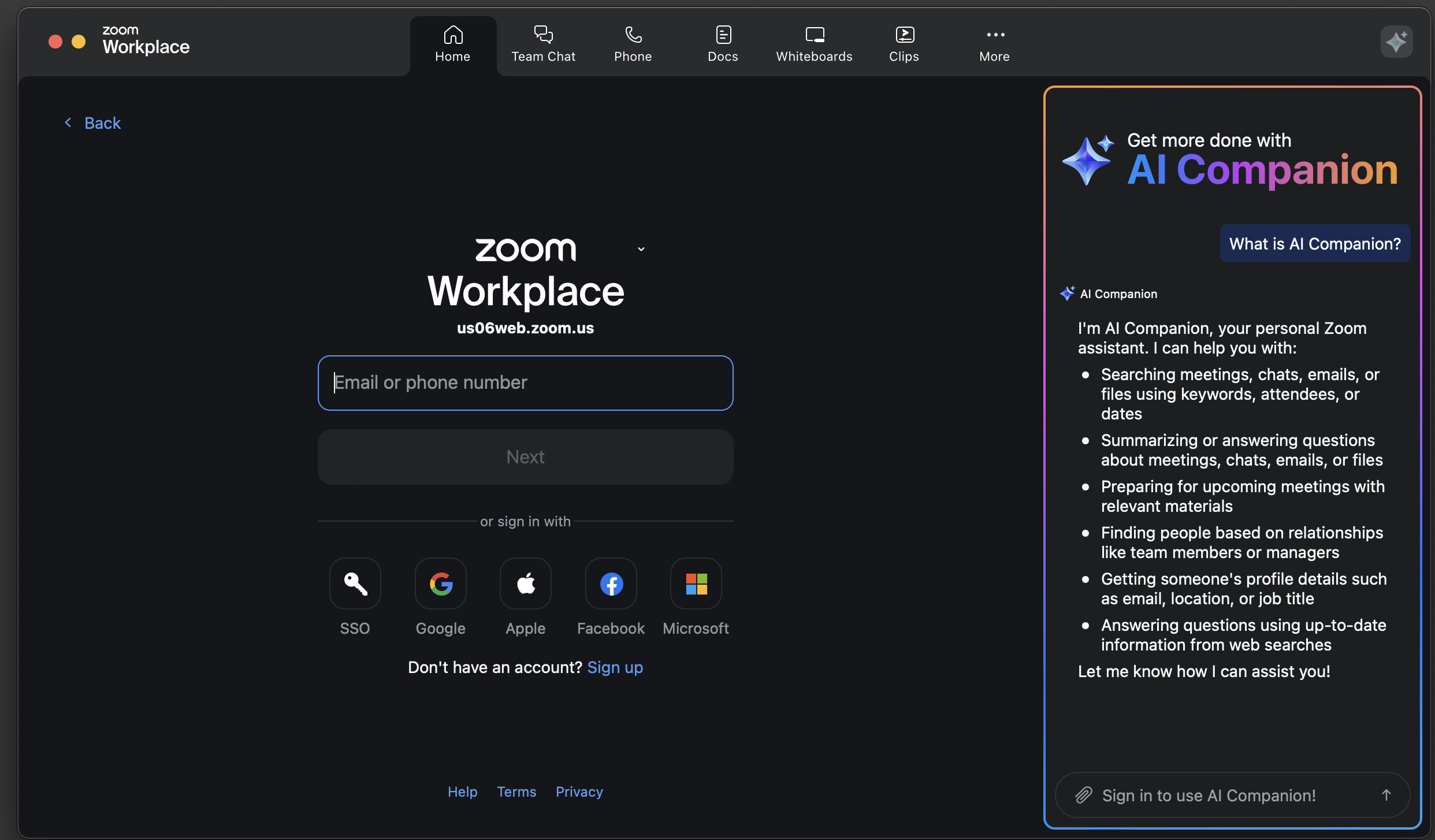
However, now the zoommtg scheme urls just open the zoom app and it just sits there and does nothing to indicate that there’s a meeting. I don’t have a video, using the zoommtg url above just launches the zoom app but it just sits there and looks like:

Hi @thand
I re-shared this information with our Engineering team and they have shared the following:

This is expected behavior. I found the same behavior in my local test: The join link opens
through a browser and then goes to the Zoom app and if the user is not logged in then it asks for login first

.

I agree that it works that way now but it seems that this is a change in behavior that has caused some problems. I don’t have a video of the prior behavior but it is my understanding that people sent in to our older meetings with a zak for a custCreate user, they weren’t prompted to login but instead went straight into the meeting. It seems that maybe the zoom app has become overly aggressive in prompting people to login including after a meeting.

Hi Thomas,
I have shared this feedback with our Engineering team and I am trying to understand if we could have made any changes on our end that could have impacted your integration