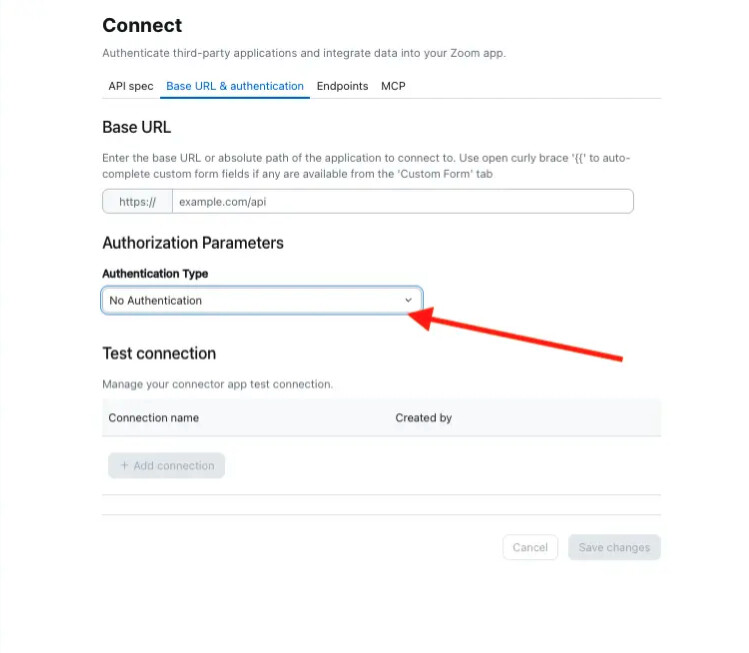
In the “Build your app” workflow, under Connect, I’ve set up an MCP connection. Now I’m trying to setup an action in Actions (which shouldn’t really be necessary since the MCP protocol can load available tools, but I understand that’s not built yet). In the “Configure your action” modal, the final Transformations step will not let me finish or create any mappings. It shows two warnings.
One says “A selected location requires at least one valid output definition with a display name and description to complete this action. Click here to jump to the Output Definition section.”, but this does nothing and the Output definition section is disabled. I think this is a red herring.
The other says “Connector needs to be set up before you can continue. Please complete configurations in the Connect section to enable this selection.“ with a “Go to Connect” button. But that button just takes me back to the Connect tab, where the MCP connection exists.
There seems to be no way to finish setting up the Action.
Thank you for taking the time to meet with us and share your feedback. We’re still working with our engineering team on a few details, but we were able to identify the steps needed to complete the Action setup.
You will also need to add the base URL for your MCP server, for example:
https://api.example.com/asa/api/v1/
After configuring this, go ahead and test the connection to confirm the endpoint is reachable.
2. Configure the Transformation
Next, navigate to the Action tab and open the Transformation page.
Select the SCRIPT option and add at least one label for the keys you want to expose. This helps make sure the fields are properly displayed when the Action is used.