I am currently a Zoom Pro user and am working on integrating RTMS (Real-time Media Streaming) into my application. However, I’ve encountered a few roadblocks and would appreciate some guidance.
1. Scope Configuration Issues I am currently configuring my app in the Marketplace Build flow. I’ve attached a screenshot of my current scopes. I am unable to find specific scopes like meeting:read:meeting_audio, which I understand are necessary for RTMS. Is there a specific app type or account requirement to enable these scopes?
2. Webhook and WebSocket Connection Issue I have successfully received the meeting.started webhook event. However, I am not receiving the specific RTMS streaming start event, which is preventing me from establishing a WebSocket connection.
Current Setup:
Environment: Development
Status: Successfully receiving standard meeting webhooks.
Problem: No RTMS-related events triggered, so the WS connection cannot be initiated.
Could you please advise if there are additional settings I need to enable in the Zoom web portal or if I am missing a specific configuration in the App Marketplace?
First of all, thank you for granting me the test permissions for RTMS.
I have successfully added the meeting:read:meeting_audio scope to my app and updated the configuration. However, even after starting a meeting, I am still not receiving the RTMS-specific webhook events.
I would like to clarify the correct implementation flow:
Triggering RTMS: Is it mandatory to manually call the PATCH /meetings/{meetingId}/livestream API to initiate the RTMS data stream? Or should the webhook be triggered automatically just by starting the meeting?
Webhook to WebSocket Flow: Is the correct sequence to wait for the meeting.live_streaming_started webhook, extract the streaming_url, and then establish the WebSocket connection?
Missing Events: If I have the correct scopes but am not receiving the webhooks, are there any specific account-level settings (other than “Custom Live Streaming Service”) that need to be toggled by Zoom or by me in the admin portal?
I am currently stuck at the step of receiving the webhook to get the WS connection details. Any guidance on what specifically to check next would be greatly appreciated.
Hi there! No problem about granting the free trial of RTMS! We want you to be able to fully experience what is possible.
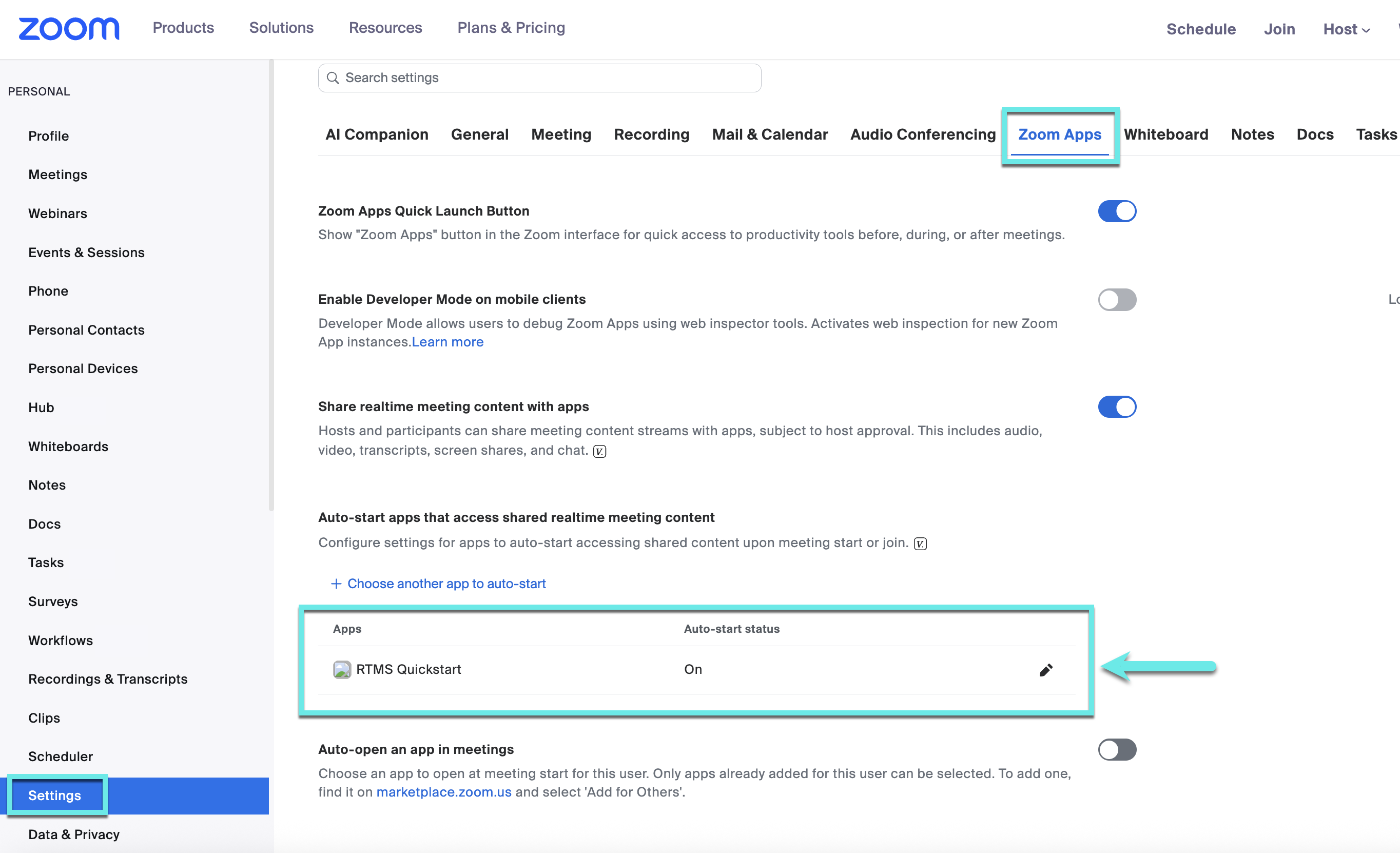
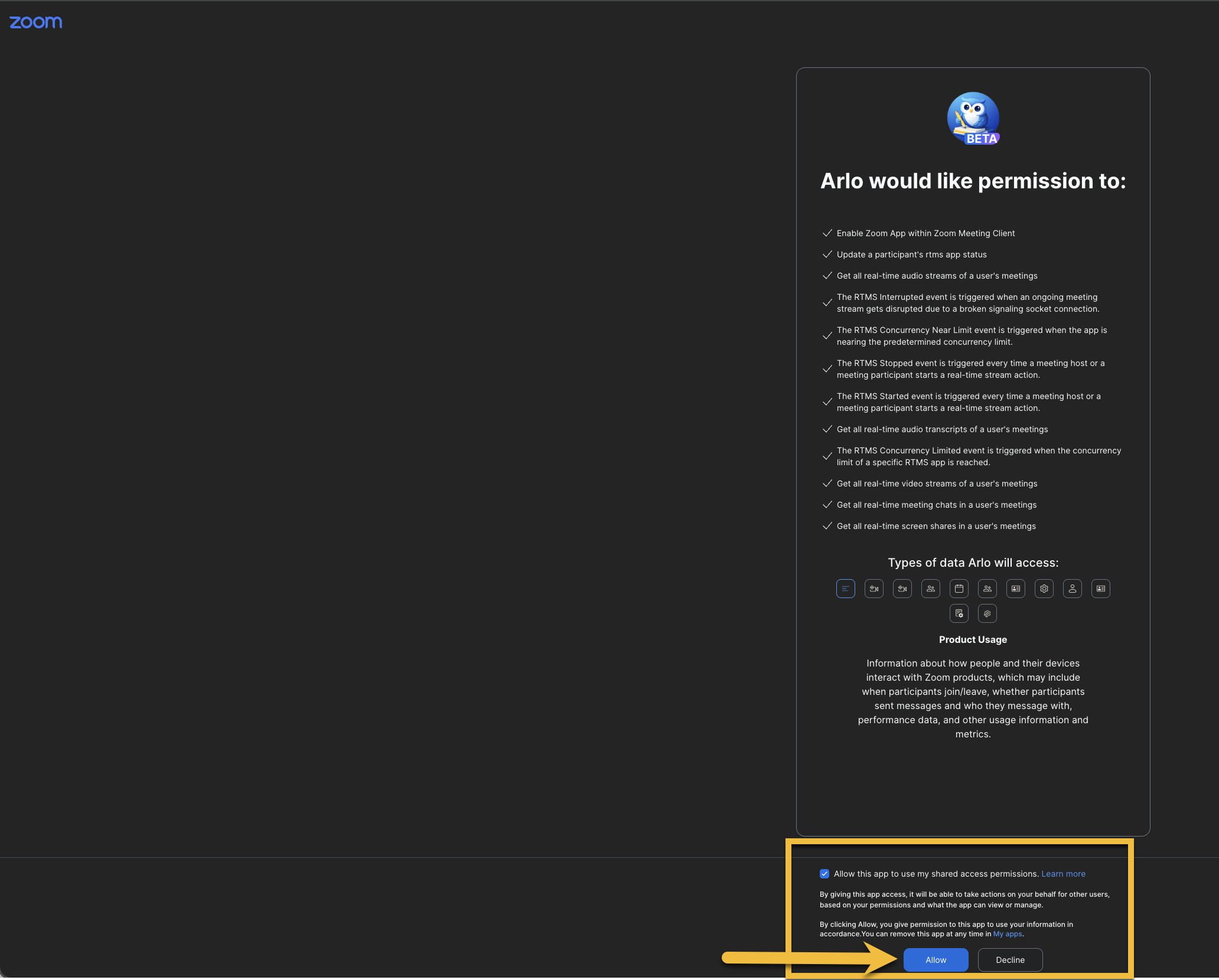
You don’t need to trigger your app starting via REST API. If you want your RTMS app to auto-start when a meeting starts, you’ll need to select that in your account settings. See screenshot attached:
This should all be happening automatically once you configure everything correctly. Let’s come back to this later if it’s still an question for you.
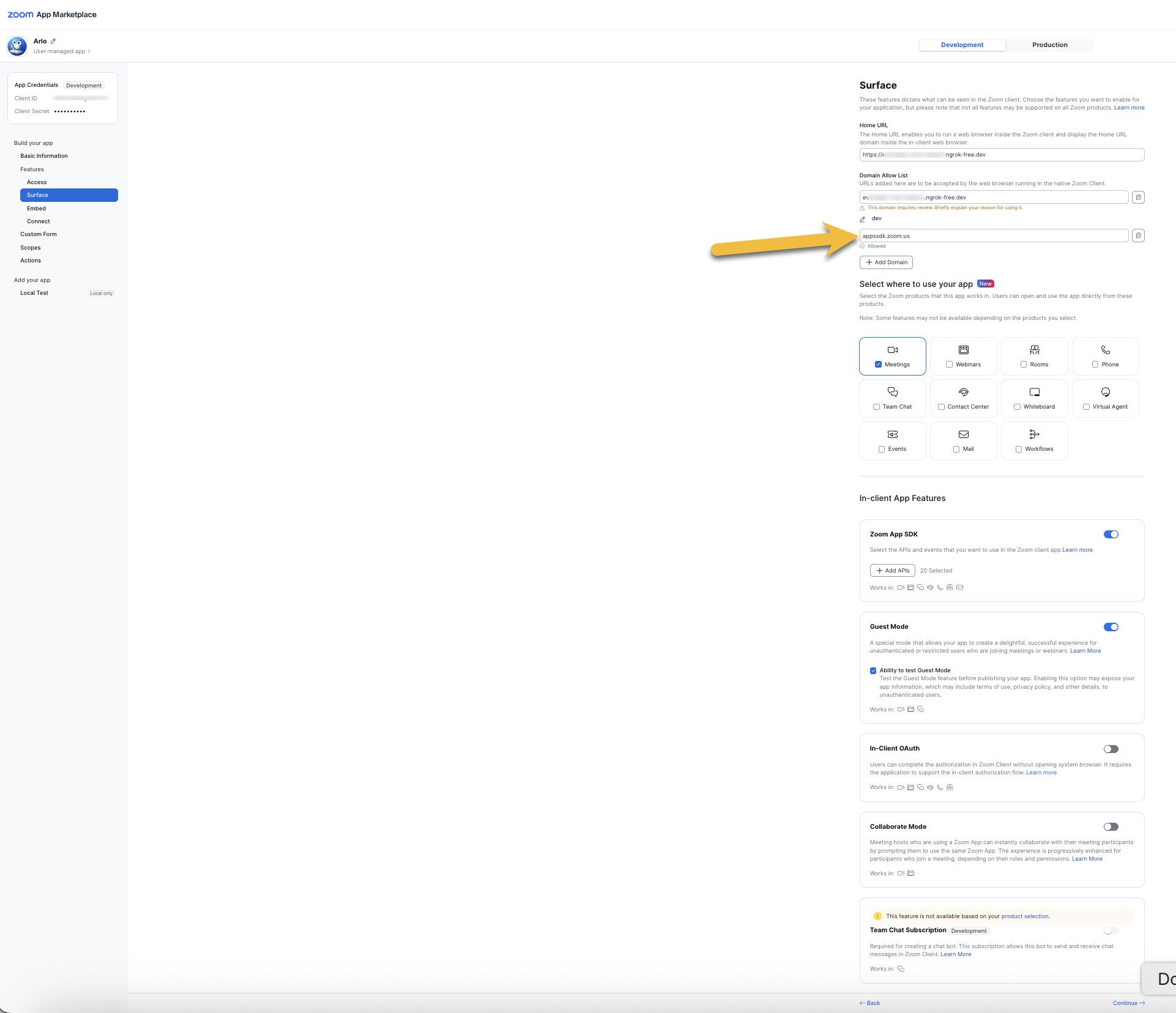
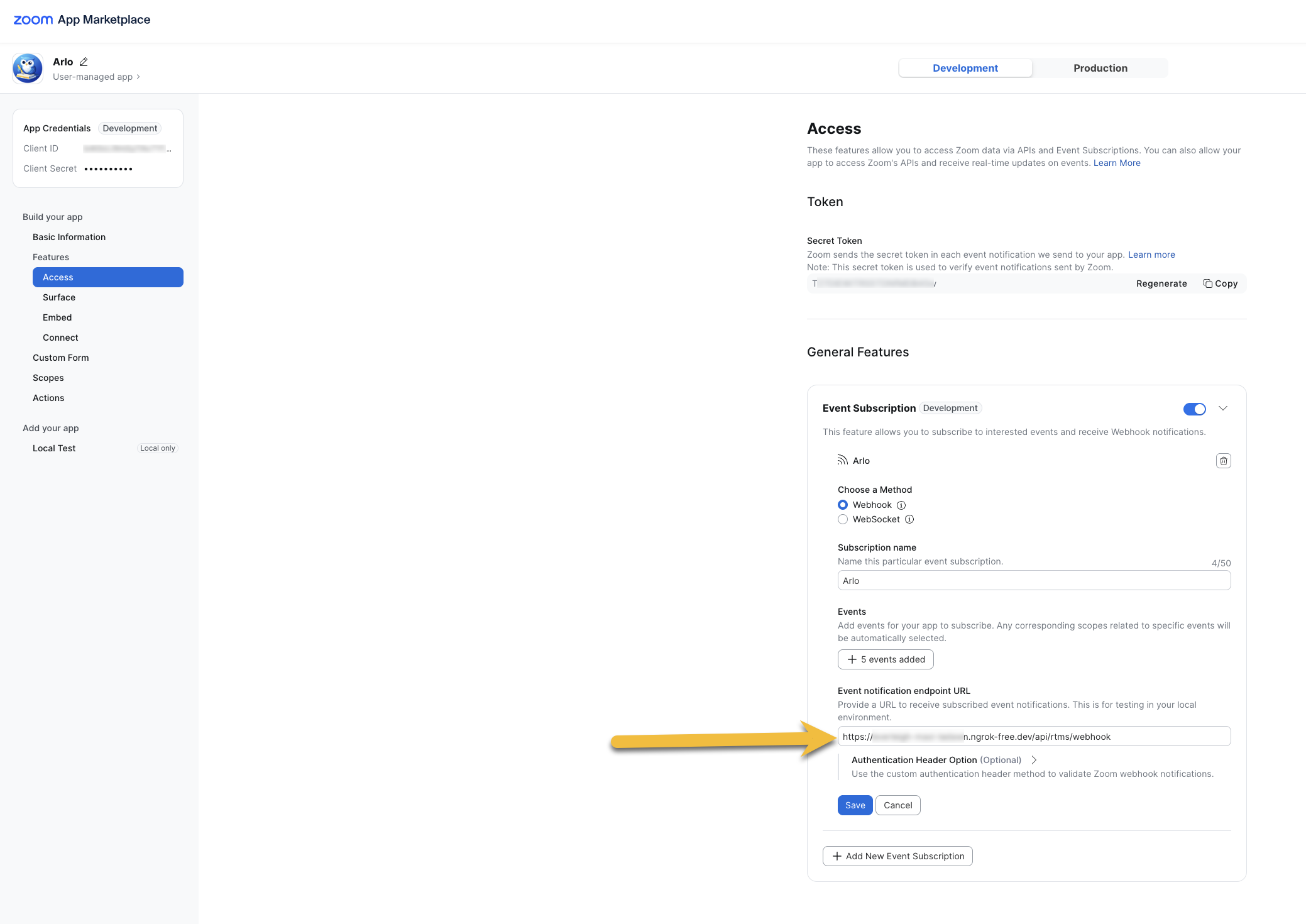
In terms of missing events, you do need to set up webhook events when manging your app. I attached screenshots of the Access tab, Basic Information, and Surface tabs for an app I’ve recently built. Your app may have different end points than my example (such as /callback or /webhook). You can check out the README for the Arlo Meeting Assistant app here. The README may help walk you through some getting started steps if you aren’t getting everything you need in the RTMS docs.
Thank you so much, it helped me solve the problem easily. However, I ran into the following problem.
I am integrating Zoom RTMS but the WebSocket connection closes with status 1000 immediately (within 2 seconds) after I send the handshake message.
I have two major concerns:
Lack of Error Response: I am not receiving any response (not even msg_type: 2 or an error message) before the connection closes. Is there any way to debug why the server is rejecting my request? (e.g., Server logs or a specific error packet)
Handshake Protocol: I am currently sending a binary packet: [1-byte type] + [4-byte length] + [JSON].
Is this binary header correct?
Should the JSON be a raw string or follow a specific Protobuf schema?
Is the signature string exactly clientId + meeting_uuid + rtms_stream_id?
Environment:
App Type: Server-to-Server OAuth
Event:meeting.rtms_started
Problem: Closed with code 1000 without any response from Zoom.
Please let me know how I can validate if my handshake packet is malformed.
Glad to hear you made progress! Regarding the WebSocket closing with code 1000 right after the handshake, here are a few things to check:
Handshake Validation
Zoom will close the RTMS WebSocket with status 1000 (“Normal close”) immediately after the handshake if the signature or handshake format is invalid. Make sure your initial message strictly follows the expected JSON structure:
The JSON should be sent as a plain UTF‑8 string (not Protobuf) inside the WebSocket frame.
2. Binary Header Format
The handshake message should not include a custom binary prefix like [1-byte type] + [4-byte length]. Zoom expects a standard WebSocket text or binary frame containing the JSON payload directly. Adding extra bytes before the JSON can cause the server to reject the handshake.
3. Signature Construction
The signature must be an HMAC‑SHA256 hash of the concatenated string clientId + meetingUuid + rtmsStreamId, using your client secret as the key.
4. Connection Closing Without Error Message
Zoom does not currently return an explicit error packet for malformed handshakes. A silent close with code 1000 is the expected behavior when the handshake fails validation.
5. Post‑Handshake Keep‑Alive
Once the handshake succeeds, Zoom will periodically send KEEP_ALIVE_REQ messages (msg_type 12). Your client must respond with KEEP_ALIVE_RESP to maintain the connection.
Recommended next steps for you to try:
Remove any custom binary header and send only the JSON payload.
Double‑check your HMAC signature generation logic.
Log the exact JSON you send before encoding to confirm it matches the expected structure.
If the connection still closes immediately after these adjustments, please share a sanitized example of your handshake payload (without your secret, of course), and we can help verify the format.
I sent the following JSON: {“msg_type”:1,“meeting_uuid”:“RE/HWbQ7QESDTyweZXDZtA==”,“rtms_stream_id”:“1d330e9ca9c04407bded276b30b64be7”,“signature”:“8945981c3b510124a768427492a15999115842a76eb23924a8100723ccde1d8f”}
My clientId is 3UVtLa_3TUa4lDu4V7lowA. Is the signature 894598… correct for this payload? If not, which exact string concatenation should I use for the HMAC-SHA256 input? Is it the Base64-encoded UUID including slashes and equal signs?
Hi - I might not be understanding where you’re at now. What is the issue you are experiencing? Can you let me know what is working and what isn’t working at this point?
Basically, I can’t verify as correct or incorrect without knowing the secret key used to generate the HMAC. However, above I have tried to communicate the correct construction logic for the signature input so you can confirm it yourself. Let me know!
For the result you mentioned above that you suggested comparing
8945981c3b510124a768427492a15999115842a76eb23924a8100723ccde1d8f,
was the signature generated using “secret” as the secretKey?
Hey, good question! I should have clarified that before. The hash I mentioned wasn’t actually generated using any real key (including the “secret.”) I just used your signature as an example so you’d have something to compare against.
If you want to confirm it yourself, try running the HMAC-SHA256 with your own secret key and this input string:
As you can see from the comment I posted at the link below,
reply link: /t/issue-with-rtms-missing-webhook-events-and-scopes-for-websocket-connection/140262/7?u=jangwon
This was the message body I logged right before sending it over the WebSocket.
I expected that the request had already been sent correctly at that time, but a 1000 close still occurred.
Are there any additional points you would recommend that I check?
As always, I sincerely appreciate your quick response.
Hello!
Is there any way to further verify the above?
As you suggested, I’ve verified the signature and other details. As you can see from my comment, the data matches the information you provided. As you mentioned, the request was processed normally, but the socket is immediately disconnected with 1000.
@Jangwon I had some experience working with Java + Spring. After sending the authentication message, Zoom did send me a websocket message, but in my experience, you need to check both the plain text (onText) and binary (onBinary) message.
If i remember correctly, it is received on the onBinary side. If you don’t respond within like a few seconds, zoom’s server will termination the connection, hence error 1000
if the signature verification passes but the WebSocket immediately disconnects, the issue often relates to the validity or scope of the originating token used to generate the rtms_stream_id. Please confirm the TTL/expiration time on the initial JWT or OAuth token used, and ensure that relevant RTMS scopes (like rtms:subscribe) were successfully granted.
msg_type: 1 meeting_uuid: Value received via webhook payload rtms_stream_id: Value received via webhook payload signature: Hash value generated using clientId and secretKey (verified above)
I’m sending this payload in JSON format (UTF-8, string).
Also, I’m listening and logging both onText and onBinary, but I’m not receiving any messages. Only the “1000 normal closing” message in onClosing is returned within 2 seconds.
Meeting_uuid and rtms_stream_id are also received and passed as webhook values, so I don’t expect this to be a major issue. However, the issue remains unresolved.
Are there any other solutions I can try?
Thank you.
When I attempt #1 on a tester account that does not have Pro/RTMS, I do not see any of these settings. Does this mean that users who do not have Pro/an RTMS trial will not be able to use apps that leverage RTMS?