Outbound Caller ID Scope Mismatch

I’m using the /phone/sites/{site_id}/outbound_caller_id/customized_numbers endpoint. With the S2S auth flow, running in postman. The token is valid still, pulled a new one roughly 5 minutes prior to writing. Other API endpoints work for me with no issue.

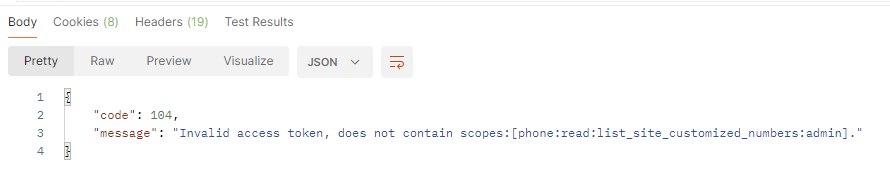
I’m getting a 104 "Invalid access token, does not contain scopes: [phone:read:list_site_customized_numbers:admin]" error. Though when I go into my application, I see the scope "phone:read:list_site_customized_number:admin" added and saved.

These aren’t the same scopes, “numbers” vs “number”, is there a second granular scope that I’m missing? The documentation seems to also mention “number”, but the API requires a “numbers” scope.

GET /v2/phone/sites/{site_id}/outbound_caller_id/customized_numbers
--header 'Authorization: {token}'

Here is a photo of the response on postman, wasn’t able to post it previously because of forum level.

Scopes added to the application that are pertinent to the issue:

Hi @wguethlein
thanks for reaching out to us!
By the screenshot you shared, it looks like the scope is not selected in your app, could you please make sure it is added and verify that the scopes come back in your response from getting the access token
Hi @elisa.zoom , the scope is added, but it’s not set to optional.

Here is the response from gaining my access token, long list of scopes as I’m testing currently, the pertinent scope is second to last.

{
     access_token: 'ACCESS_TOKEN',
     token_type: 'bearer',
     expires_in: 3600,
     scope: 'user:read:list_users:admin user:write:user:admin user:read:user:admin user:update:user:admin user:delete:user:admin user:update:status:admin user:update:password:admin user:write:assistant:admin user:delete:assistant:admin user:write:profile_picture:admin user:delete:token:admin user:delete:scheduler:admin user:update:email:admin user:update:presence_status:admin user:update:settings:admin user:write:virtual_background_files:admin user:delete:virtual_background_files:admin user:write:feature:admin user:delete:profile_picture:admin account:update:options:admin account:update:settings:admin account:update:lock_settings:admin account:update:owner:admin account:update:registration_settings:admin phone:update:number:admin phone:update:settings:admin phone:update:user:admin phone:write:user_number:admin phone:read:list_sites:admin phone:write:site:admin phone:read:site:admin phone:update:site:admin phone:write:batch_users:admin phone:update:batch_users:admin phone:read:list_site_customized_number:admin zra:read:indicator:admin',
     api_url: 'https://api.zoom.us'
}

Thanks @wguethlein
I will send you a DM to get more details about this issue.
Please follow up there

This topic was automatically closed 368 days after the last reply. New replies are no longer allowed.